%20--%3e%3cdefs%3e%3cstyle%3e%20.st0%20{%20fill:%20%23292c64;%20}%20.st1%20{%20fill:%20%231d1d1b;%20}%20.st2%20{%20fill:%20%23fff;%20}%20%3c/style%3e%3c/defs%3e%3cg%3e%3ccircle%20class='st0'%20cx='43.4'%20cy='43.4'%20r='34.6'/%3e%3cpath%20class='st2'%20d='M52.8,49.7c-1.3-.3-2.6-.6-3.5-1-1.5-.7-2.7-1.7-4-2.8-2.5-2-5.3-4.3-9.9-4.3s0,0-.1,0c-.1,0-.2,0-.4,0h-.4c-4.1.2-7.7.9-10.2,1.6,0-11,8.4-19.6,19-19.6s11.2,2.8,14.6,7.1c.8.7,1.6,1.2,2.4,1.2,1.7,0,3-1.3,3-3s-.3-1.5-.8-2.1c-4.4-5.3-11.2-8.9-19.2-8.9-14.1,0-25.2,11.2-25.2,25.5s10.6,24.9,24.2,25.4c1.1,2.1,3.1,3.5,5.5,3.5s5.3-2,6-4.7c0,0,0,0,0,0,2.6-.4,4.9-1.6,6.5-3.4,1.5-1.7,2.2-3.8,2.1-6-.4-6.3-6-7.5-9.7-8.4ZM47.8,68.7c-1.7,0-3-1.3-3-3s1.3-3,3-3,3,1.3,3,3-1.3,3-3,3ZM56.3,60.5c-.7.8-1.9,1.4-3.2,1.6-1.1-1.8-3.1-3-5.3-3s-4.7,1.6-5.7,3.8c0,0,0,0,0,0-8.3-.5-15.1-6.4-17.2-14.4,2.2-.6,5.7-1.4,9.8-1.6h.3c0,0,.2,0,.2,0,2.7,0,4.3,1.3,6.6,3.1,1.4,1.2,3.1,2.5,5.2,3.5,1.4.6,3,1,4.5,1.3,4.1.9,5.3,1.5,5.5,3.4,0,.8-.2,1.5-.7,2.1Z'/%3e%3c/g%3e%3cg%3e%3cg%3e%3cpath%20class='st1'%20d='M108.8,24.3c4.1,0,12,1.3,12,6.3s-1.4,3.8-3.5,3.8-3.9-2-8.6-2c-6.9,0-10.5,5.9-10.5,12.7s3.6,12.4,10.5,12.4,6.6-2.4,8.9-2.4,3.7,2.5,3.7,3.8c0,5.4-8.5,6.6-12.6,6.6-11.4,0-19.3-9-19.3-20.6s7.8-20.6,19.3-20.6Z'/%3e%3cpath%20class='st1'%20d='M136.8,28.9c1-2.6,3.1-4.6,6-4.6s5,2,6,4.6l11,30.5c.3.9.4,1.7.4,2.1,0,2.2-1.8,3.7-3.9,3.7s-3.5-1.2-4.1-2.9l-1.7-5.3h-15.6l-1.7,5.2c-.6,1.7-1.7,3-4,3s-4.1-1.7-4.1-3.9.3-1.6.4-1.8l11.3-30.5ZM137.4,49.3h10.6l-5.2-16.2h-.1l-5.3,16.2Z'/%3e%3cpath%20class='st1'%20d='M165,29.3c0-2.7,1.5-4.4,4.3-4.4h9.9c8.6,0,13.9,3.9,13.9,12.7s-4.6,9.7-10.4,10.6l9.5,10.2c.8.8,1.1,1.7,1.1,2.5,0,2.2-1.7,4.3-4.2,4.3s-2.4-.4-3.2-1.5l-12.4-15.1h-.1v12.2c0,2.8-1.8,4.4-4.2,4.4s-4.2-1.6-4.2-4.4v-31.5ZM173.4,42.6h5.8c3.1,0,5.2-1.8,5.2-5s-2.1-4.9-5.2-4.9h-5.8v9.9Z'/%3e%3cpath%20class='st1'%20d='M198.4,29.3c0-2.7,1.5-4.4,4.3-4.4h9.9c8.6,0,13.9,3.9,13.9,12.7s-4.6,9.7-10.4,10.6l9.5,10.2c.8.8,1.1,1.7,1.1,2.5,0,2.2-1.7,4.3-4.2,4.3s-2.4-.4-3.2-1.5l-12.4-15.1h-.1v12.2c0,2.8-1.8,4.4-4.2,4.4s-4.2-1.6-4.2-4.4v-31.5ZM206.8,42.6h5.8c3.1,0,5.2-1.8,5.2-5s-2.1-4.9-5.2-4.9h-5.8v9.9Z'/%3e%3cpath%20class='st1'%20d='M231.5,29c0-2.8,1.8-4.4,4.2-4.4s4.2,1.6,4.2,4.4v19.5c0,5.2,3.3,9.2,8.6,9.2s8.6-4.3,8.6-9.2v-19.5c0-2.8,1.8-4.4,4.2-4.4s4.2,1.6,4.2,4.4v20c0,9.4-7.7,16.5-17,16.5s-17-7-17-16.5v-20Z'/%3e%3cpath%20class='st1'%20d='M296,29.9c0,2.2-1.5,4.1-3.8,4.1s-4.1-1.7-7.4-1.7-4.6,1.3-4.6,3.6c0,5.8,18.7,2.1,18.7,16.5s-6.6,13-14.3,13-13.6-1-13.6-6.3,1.5-4,3.8-4,5.8,2.2,9.4,2.2,5.7-2.1,5.7-4.8c0-6.6-18.7-2.6-18.7-15.6s6.4-12.7,13.9-12.7,11,1.2,11,5.6Z'/%3e%3cpath%20class='st1'%20d='M304.7,29c0-2.8,1.8-4.4,4.2-4.4s4.2,1.6,4.2,4.4v28.1h10c2.9,0,4.1,2.1,4,4-.1,1.8-1.6,3.7-4,3.7h-14c-2.7,0-4.4-1.8-4.4-4.6v-31.2Z'/%3e%3cpath%20class='st0'%20d='M330.5,41.7c0-2.4,1.7-4,4-4s4,1.6,4,4v19.4c0,2.4-1.7,4-4,4s-4-1.6-4-4v-19.4Z'/%3e%3cpath%20class='st1'%20d='M345.1,29c0-2.8,1.8-4.4,4.2-4.4s2.8.8,3.5,1.8l17.8,23.7h.1v-21.2c0-2.8,1.8-4.4,4.2-4.4s4.2,1.6,4.2,4.4v31.8c0,2.8-1.8,4.4-4.2,4.4s-2.7-.8-3.5-1.8l-17.8-23.4h-.1v20.9c0,2.8-1.8,4.4-4.2,4.4s-4.2-1.6-4.2-4.4v-31.8Z'/%3e%3cpath%20class='st1'%20d='M386.1,28.8c0-2.3,1.7-4.1,4.2-4.1s4.2,1.6,4.2,4.1v12.1l13.8-14.7c.6-.7,1.7-1.6,3.2-1.6s4.1,1.6,4.1,4-.9,2.6-2.7,4.5l-10.6,10.4,12.9,13.5c1.3,1.3,2.4,2.6,2.4,4.3,0,2.6-2.1,3.9-4.4,3.9s-2.7-1-4.3-2.6l-14.5-15.7v14.3c0,2.2-1.7,4-4.2,4s-4.2-1.6-4.2-4V28.8Z'/%3e%3c/g%3e%3ccircle%20class='st0'%20cx='334.5'%20cy='29'%20r='4.7'/%3e%3c/g%3e%3c/svg%3e)
Guide · AI photo optimisation
Live in the platform· available nowAI photo optimisation for car dealers: consistent listing photos without a studio
Photos sell cars. But most independent dealers have no studio, so the same model photographed by two salespeople looks like two different cars. With AI optimisation taken straight from a phone or PC, you can lift every photo to the same level, same background and same look – without hiring a photographer or building a studio. This guide walks through how the feature works in CARRUSLiNK, what you can actually do with it, what results to expect, and why it only really makes sense when it lives inside your CRM, not as a separate tool.
Last updated:
Short answer (TL;DR)
Snap photos with your phone on the lot, upload from PC, or push from the workshop. CARRUSLiNK AI-optimises the image to a consistent background (white studio or your own showroom), normalises light and perspective, and saves it as a new photo on the vehicle card. The original is always kept. Result: consistent listing photos on portals without a studio, without Photoshop and without salespeople learning a new tool.
Why car photos are a real dealer problem
- Three salespeople photograph the same model in three different spots with three different phones
- The portal listings look like a patchwork: gravel, rain, harsh shadows across the wheel arches
- Prep is done at 4pm but nobody is free to take 'proper' photos, so the car sits online for a day with no images
- External photo studios cost EUR 30-60 per car and add 1-2 days to prep time
- Photoshop license + someone willing to learn it is a bottleneck that always gets dropped
- Workshop photos (ready-notification to the customer) look amateur if you reuse them in the listing later
- Competitors with consistent studio photos look bigger and more professional, even when smaller
- Switching brand focus or season requires re-shooting the whole lot to look cohesive
How AI photo optimisation works in CARRUSLiNK
1. Take or upload the photo
Take a photo directly with your phone via the CARRUSLiNK web app (camera opens in the browser), upload from PC, or receive it automatically from the workshop when prep is done. The photo lands on the vehicle card in the Photos section.
2. Pick a style
In the 'Optimise photo with AI' dialog, choose between standard styles like White studio (clean white background, useful for portals), Showroom (your own showroom background if uploaded), or a seasonal background. Styles are defined per account so the whole dealership gets the same look.
3. The AI processes the image
The car is cut from the background, perspective is aligned to a standard angle, light and colour balance are normalised, and the chosen background is applied. It takes 5-15 seconds per photo. You see a live preview with original on the left and result on the right.
4. Save as a new photo, original is kept
Click Save as new photo. The AI photo is added next to the original on the vehicle card. The original is never deleted, so you can always go back or use the raw photo elsewhere (an internal overview or an honest social post).
5. Use it in advertising
The optimised photo can be set as the main image on the vehicle card, which is automatically used when CARRUSLiNK pushes the listing to Bilbasen, AutoUncle, DBA, Biltorvet and your own website via integration. No manual copying, no file juggling.
6. Regenerate if you're not happy
AI models don't give the same output twice. If the car sits slightly off or a headlight looks wrong, click Regenerate for a new attempt. Costs nothing extra and takes 5-15 seconds. You only save what you want.
7. Ready-notification and social photos
The same function applies when the car is finished at the workshop and you send a 'your car is ready' SMS. A quick mobile photo from the workshop becomes a clean close-up that attaches to the SMS or email. Better customer experience, consistent brand.
8. Configuration and guardrails
Under Account settings you choose which styles salespeople may use, whether there should be a consistent background per vehicle status (stock, demo, trade-in), and whether a custom showroom background is allowed. The AI model never changes license plate, colour or body details – only background, light and perspective.
What you get from AI-optimised car photos
Consistent look across the whole lot
All cars on portals and your site look like they were shot on the same day in the same place. The dealer feels bigger and more professional.
Mobile-first, no studio
Salespeople and workshop staff shoot with their own phone in the web app. No lighting, no backdrop, no external photographer.
5-15 seconds per image
Every optimisation takes seconds. A typical 6-10 photo car is done in 1-2 minutes, and the salesperson sees the result before saving.
Original is always kept
The AI photo sits next to the original, not in place of it. If you ever need the raw photo (e.g. a claim), it's still on the car.
Styles per account, not per salesperson
White studio, your showroom, seasonal background. Defined in one place so every salesperson works from the same palette. Consistency without training.
12 digital showrooms
Beyond white studio you can pick from 12 digital showroom backgrounds, indoor and outdoor. The background is chosen after the photo is taken, so the whole lot shares one look across portals, your site and social.
Higher CTR and more leads
Consistent, clean photos with stripped backgrounds get higher click-through on portals. We typically see 10-25% CTR lift from listings that get the treatment vs. raw mobile photos.
AI photo in CRM vs separate photo app
| Area | Separate AI photo tool (microservice) | AI photo in CARRUSLiNK |
|---|---|---|
| Where the image lives | On the photographer's PC or a separate cloud folder | Directly on the vehicle card, same place as price and status |
| Who can use it | Whoever has the tool installed | All salespeople and workshop, mobile or PC |
| What happens after optimisation | Manual download → upload to CRM → upload to portal | Set as main image, auto-pushed to portals |
| Original kept | Depends on setup | Always. AI photo sits next to the original |
| Style consistency across staff | Each user picks their own preset | Styles defined per account in settings |
| Pricing model | Per image or monthly separate subscription | Built into CARRUSLiNK |
| Workshop photo for ready-SMS | Must be exported manually, rarely done | Same flow as stock photos, one click |
| Staff change | New license, new training, knowledge lost | Same login as the rest of the system, no extra setup |
Standalone microservice tools can be great on their own, but in dealer life the image needs to go somewhere next. When AI optimisation lives inside the CRM, the salesperson doesn't have to remember 4 extra steps per car.
Drag the handle – before and after
Phone photo taken on the lot on the left, AI-optimised 'White studio' on the right. The original is always kept on the vehicle card.
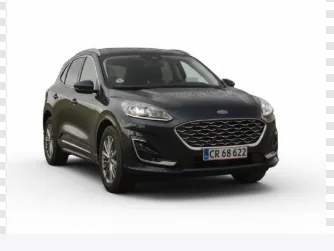
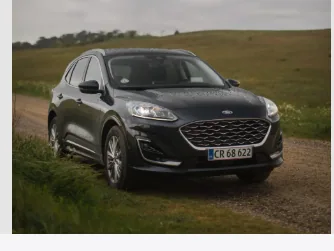
Example from the CARRUSLiNK platform. The car, colour and number plate are never changed – only background, light and perspective.
This is how it looks in the system
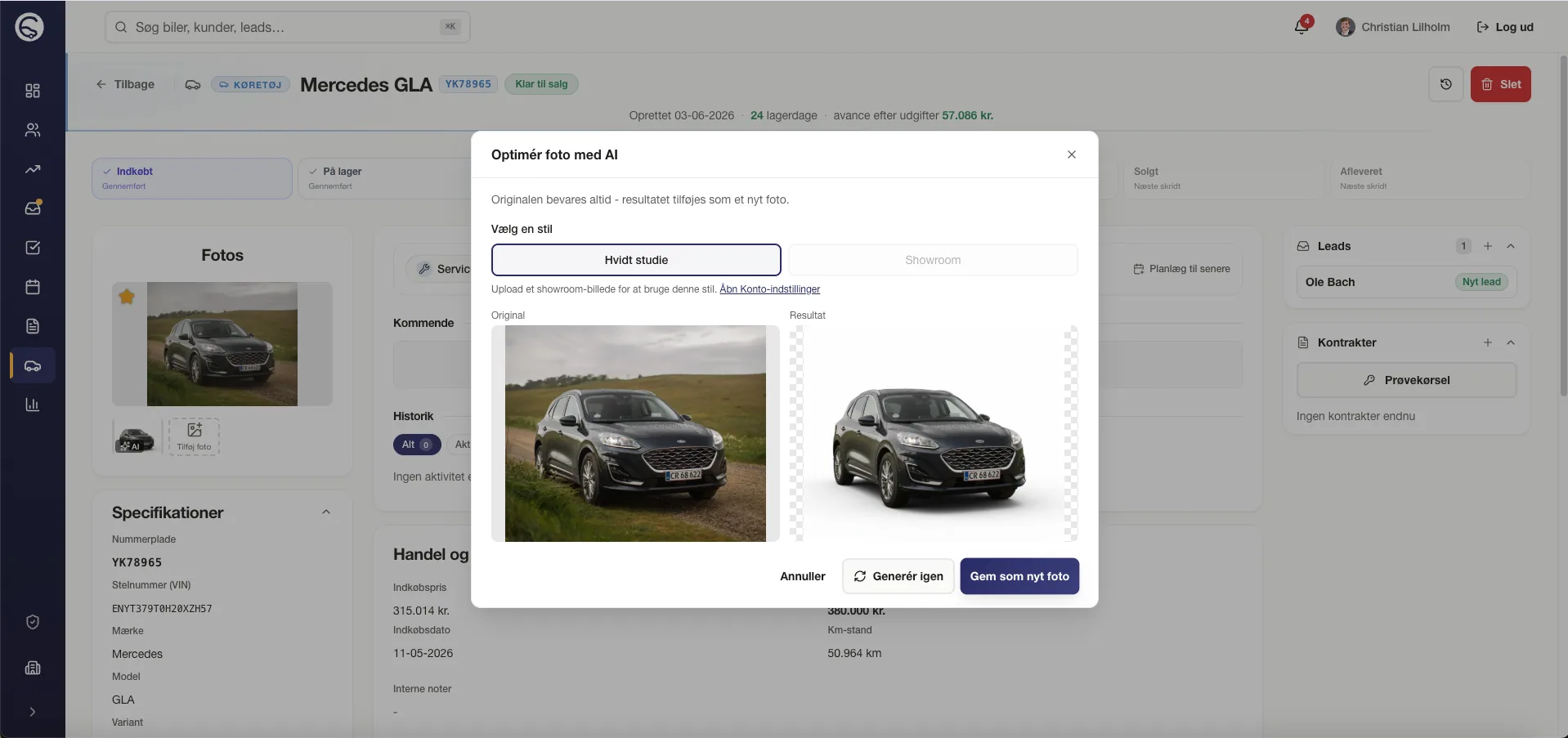
The 'Optimise photo with AI' dialog opens from the vehicle card. The salesperson picks a style, reviews the result and clicks 'Save as new photo'.
Frequently asked questions about AI photo optimisation
See the AI photo feature on your own images
30-minute demo. We optimise 3-5 of your current car photos live, show before/after on portals and walk through how styles are set up for the whole dealership.